Charges
A Charge is a Merchant initiated request for payment from a Consumer to a Merchant.
There are two variations of the flow: one where the Consumer must enter their PIN to confirm payment, and a second where the Consumer must validate the payment via a Web confirmation mechanism.
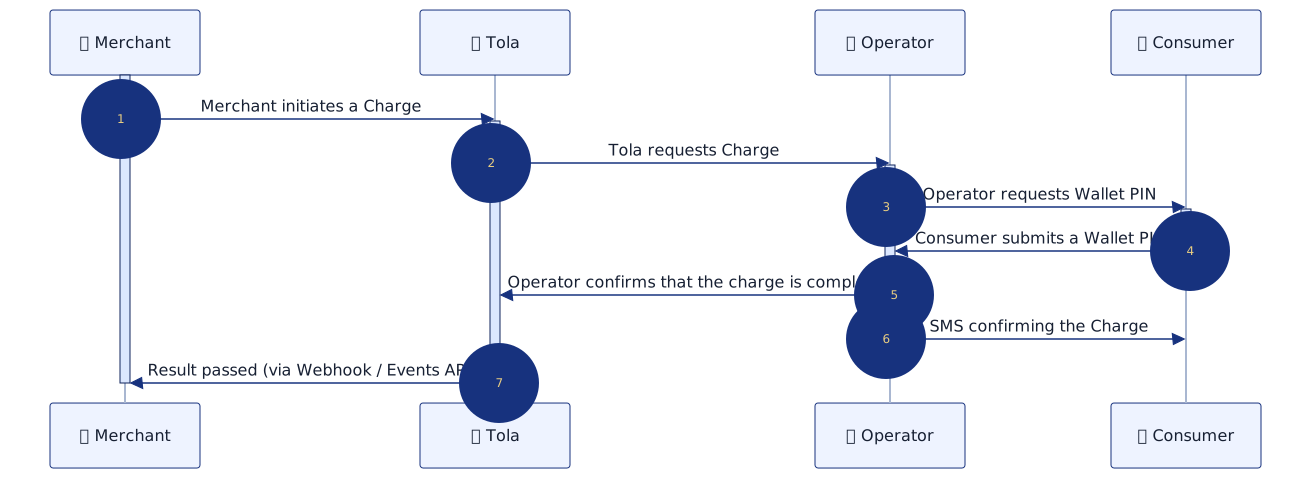
As part of the Operator processing of the Charge, the Operator will send a Charge Request approval message to the Consumer's handset, to obtain approval to deduct the funds.
Usually this involves the Consumer promptly entering their wallet PIN when prompted. If the Wallet PIN is not entered correctly or promptly the Charge will not be successful.
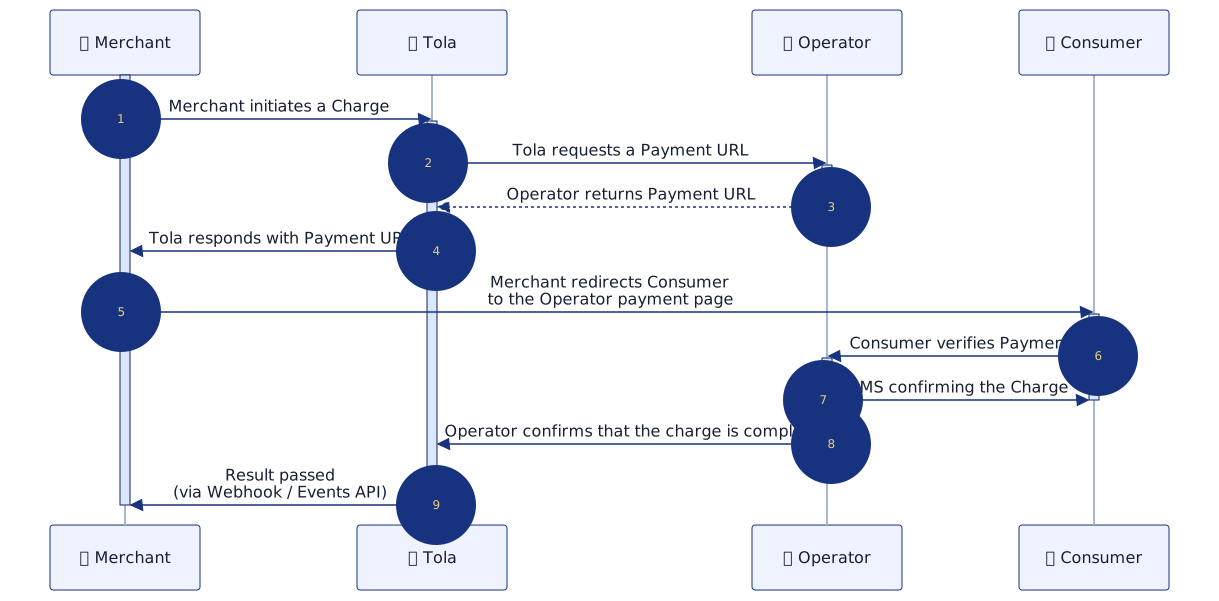
Your merchant platform will need to direct the consumer to the provided payment link to confirm the transaction. The payment link generally remains valid for a set period of time, which can be different from Operator to Operator.
If the payment is not verified within the validity period of the payment URL the Charge will not be successful.
In order to use this flow you need to provide Tola with a continuation URL that the user will be redirected to once the verification is complete.
Account / Paybill Setup
Before you can use the Tola Mobile Wallet you will need to contact the Operators you want Mobile Money support with to obtain Merchant accounts (often referred to as Paybills).
Once approved the Operator will supply details including credentials to these Accounts/Paybills. Please supply the API related credentials to the Tola Wallet Merchant onboarding team who will verify connectivity and carry out any UAT required by the Operator.
You will be supplied with a Tola Wallet API URL and associated credentials. For additional security we will only allow access to this URL from your IP address(s).
If you would like to receive callback webhooks you can provide a HTTPS URL to the Tola Wallet Merchant onboarding team at this point. Note however that for reliability we recommend you use the Tola Wallet Events API instead of the callback mechanism.
How you initiate a Charge
A Charge will typically be initiated from your app or website where your Consumer will be registered with a verified and validated MSISDN. This is normally undertaken through a two factor authentication process, either with a one time PIN sent to the Consumer’s handset or a Login secret PIN generated and sent to the Consumer’s handset. This prevents the initiated Charges being made to unsolicited consumers as part of phishing scams.
In addition to the msisdn you will need to know the channel the msisdn is registered with and the target account that will be receiving the payment.
In most cases Operators prefer seperate accounts for C2B and B2C.
curl --request POST \
  --user username:password \
  --url https://apidocs.tolamobile.com/transaction \
  --header 'Content-Type: application/json' \
  --data '{
  "msisdn": "254000000001",
  "type": "charge",
  "channel": "KENYA.SAFARICOM",
  "currency": "KES",
  "amount": 100,
  "sourcereference": "8FD2KuZNJnBPLKmz"
}'
channeluses the convention <COUNTRY>.<OPERATOR>
The Tola Wallet Merchant onboarding team will supply the valid channels for each connectiontargetis the account identifier (or paybill number) and will be supplied by the Operatorsourcereferenceshould be a unique identifier supplied from your application. This can be used to cross reference records between your application and Tola. Recent Duplicates (within 48hrs) will be rejected
If the request is validated by the Tola Wallet Platform a unique reference for the Charge will be returned.
{
   "reference" : "5.101.1650635745.1",
   "success" : true
}
Based on the transaction type and channel the Charge will be routed within the Tola Wallet platform to the appropriate Operator API where the Tola Wallet platform will initiate the Charge.
See creating a transaction for the full specification.
Confirmation of the transaction
If the Charge is processed correctly and funds are transferred, the Tola Wallet platform will use its API connection with the Operator to determine the final status of the Charge. This results in the creation of a Notification transaction on the Wallet plaform. This can be consumed by the Events API or reported to your merchant application by issuing a callback to your pre configured webhook.
{
  "reference": "1.123.1435455096.2",
  "success": "false",
  "sourcereference": "5.101.1650635745.1",
  "customerreference": "8FD2KuZNJnBPLKmz",
  "operatorreference": "CI220530.1717.A38729",
  "channel": "KENYA.SAFARICOM",
  "target": "000001",
  "date":"2022-05-30T17:19:01Z",
  "type": "notification",
  "currency": "KES",
  "amount": "100",
  "amounttype": "centile",
  "msisdn": "254000000001",
  "errorcode": 1,
  "errormessage": "insufficient funds",
  "campaignid": "10001"
}
Important Fields
successindicates the outcome of the funds-transfer where true indicates that funds were transferred.sourcereferenceis the unique Tola reference for the Transaction which was created when you calledPOST /transaction.customerreferenceis the reference you provided when callingPOST /transaction.errorcodeanderrormessagewill map to a Callback Error. Different Operators provide different levels of information when failing a transaction. The Tola Wallet platform will map the Operator provided error code to the most appropriate Tola Wallet API error code
See the appropriate page below for a full specification:
- "Callbacks" section on the Create a Transaction page, or
- Events page.
Handling Confirmations
When you receive a confirmation event with type=notification (by callback or Events API) you need to locate the associated pending record on your Merchant system by using either the sourcereference or customerreference from the confirmation payload.
If the reference you send to us is always unique then we recommend using the customerreference since it can better resolve situations where you experienced uncertainty (eg. a network timeout) when calling POST /transaction (very rare).
Lifecycle
As soon as you consume the Notification the lifecycle of the Charge is complete. It will form part of your statistical overview and will be available to view and download in our portal.
Typically the lifecycle of a Charge is around 90 seconds due to the delay for the user to verify the charge but can be longer in anomalous circumstances. This will vary from Operator to Operator.
The Tola Wallet platform guarantees a Notification for every Charge.
In some rare cases it is not possible for Tola to confirm the final status of a transaction - for example if the Operator fails to provide confirmation of the transaction's final status to Tola. Tola provides reconciliation tools for the resolution of these cases where possible.