Events API Guide
What is the Events API?
The Tola Events API lets merchants read from a chronological, stream of real-time events that represent the final state of transactions processed on the Tola platform. Each time a transaction reaches a final state, a corresponding event is appended to the end of the stream.
The Events API can serve as a drop-in replacement for webhooks. Unlike webhooks, which push individual notifications, the Events API allows merchants to pull a continuous live stream of transaction events as they finalize.
Tola recommends using the Events API instead of webhooks because in certain exceptional scenarios, webhook callbacks may not be reliably delivered. These include:
- Network instability between Tola Wallet & your platform
- Disaster Scenarios where an application goes down on either side
The Events API does not support querying the status of individual transactions.
Calling the Events API
When you call the Events API for the first time, your system won’t yet have any event information stored. For this initial request, include the last_event parameter in the HTTP GET call and set its value to an empty string.
If last_event is set to a non-empty value, the API treats it as a pointer and returns events after the specified event. The Events endpoint retains transactions for up to 30 days, so the earliest available event may be up to 30 days old.
In this example, long_poll is set to 20 seconds. This means the API request will wait up to 20 seconds for new events before returning a response, allowing near real-time updates without excessive polling. Note that the long_poll argument's allowed range is between 15-60 seconds.
curl -X GET \
  --user username:password \
  --url https://apidocs.tolamobile.com/walletapi/testrelay/events?long_poll=20&last_event=
Below is a segment of the response. The full payload and descriptions can be found here.
{
   "events" : [
      {
         "metadata" : {
            "event_id" : "1.106.1692874379.2",
            "webhook_delivered" : false,
            "payload_format": "mobile-money"
         },
         "payload" : {
            ...
         }
      },
      {
         "metadata" : {
            "event_id" : "wc_00E7I1RBN8X",
            "webhook_delivered" : false,
            "payload_format": "checkout"
         },
         "payload" : {
            ...
         }
      }
   ],
   "last_event" : "wc_00E7I1RBN8X",
   "last_event_time" : "2023-08-24T10:52:59Z",
   "num_rows" : 2,
   "success" : true
}
- Each response contains up to 100 events
- Parse the array of events to update transaction statuses on your platform.
- The
last_eventfield in the response should be stored by the merchant in a database and used in the next Events API request to fetch new events which occurred after thislast_event, it acts as a pointer to page through the Events stream in chronological order.
In the example above, the next Events API request should be:
curl -X GET \
  --user username:password \
  --url https://apidocs.tolamobile.com/walletapi/testrelay/events?long_poll=20&last_event=wc_00E7I1RBN8X
Here, the last_event value from the previous response is passed as a GET argument in the request.
Repeat this process to receive real-time updates as transactions reach completion.
The merchant should only have a single thread performing long polls. If a second long poll request is sent to Tola while an earlier one is in progress the second request will be rejected.
To summarize, here’s how to page through the event stream:
- Call the Events endpoint.
- Store the last_event value from the response.
- Include this last_event in the next request as a GET argument to fetch only newer events.
- Repeat for each subsequent request.
Each Events API response includes a last_event field. This
value should be used in the next API request as a GET argument to page
through the events stream. Merchants are strongly encouraged to
store this value in a database, so that in the event of a
Merchant application restart, processing can continue from where it left
off.
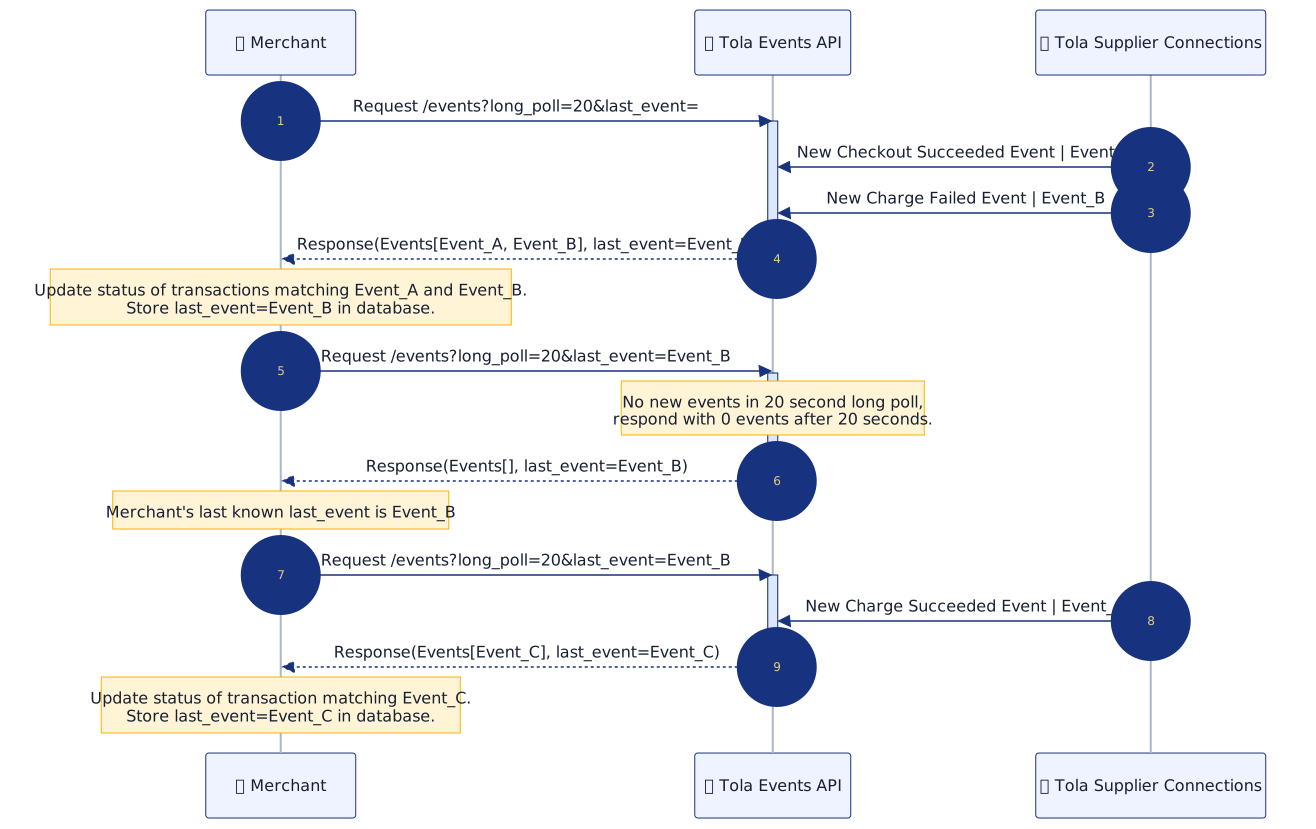
Sequence Diagram
Below shows the typical usage of the Events API and describes how it can be used to reconcile transactions on the merchant application by paging through the events stream in real time using long polling and the last_event pointer.
Code Example (python)
The sample code below offers a Python client to help you understand how to implement the Events API.
The script accepts endpoint, username & password as command line arguments, the values to be used will be provided during your integration to the Tola Wallet Platform.
#!/usr/bin/env python3

import time
import logging
import signal
import sys
import argparse
import base64
import json
import urllib.request
from urllib.parse import quote
from typing import Tuple, Optional, List, Dict, Any

LONG_POLL_DURATION: int = 20
BACKOFF_PERIOD: int = 5

logging.basicConfig(level=logging.DEBUG, format='%(asctime)s - %(levelname)s - %(message)s')
logger: logging.Logger = logging.getLogger(__name__)

def parse_arguments() -> argparse.Namespace:
    parser = argparse.ArgumentParser(description="Tola Mobile Wallet Long Polling Client")
    parser.add_argument("--endpoint", "-e", required=True, help="Events API endpoint (required)")
    parser.add_argument("--username", "-U", required=True, help="API username (required)")
    parser.add_argument("--password", "-P", required=True, help="API password (required)")
    return parser.parse_args()

def signal_handler(_sig: int, _frame: Any) -> None:
    logger.info("Shutting down gracefully...")
    sys.exit(0)

def get_last_event() -> str:
    """Retrieve the last processed event ID from persistent storage (e.g., database)."""
    # TODO: Implement retrieval from your database
    return ""

def save_last_event(last_event: str) -> None:
    """Save the last processed event ID to persistent storage (e.g., database)."""
    # TODO: Implement saving to your database
    pass

def process_event(event: Dict[str, Any]) -> None:
    """Process wallet event and reconcile the associated transaction in your merchant application."""
    # TODO: Implement your business logic here
    event_id = event.get("metadata", {}).get("event_id", "unknown")
    logger.info(f"Processing event_id: {event_id}")

def http_get(url: str, username: str, password: str, timeout: int) -> Tuple[Optional[int], str]:
    credentials = f"{username}:{password}".encode("utf-8")
    auth_header = f"Basic {base64.b64encode(credentials).decode('utf-8')}"
    req = urllib.request.Request(url)
    req.add_header("Authorization", auth_header)
    try:
        with urllib.request.urlopen(req, timeout=timeout) as response:
            return response.getcode(), response.read().decode("utf-8")
    except Exception as e:
        return None, str(e)

def fetch_and_validate(
    endpoint: str,
    username: str,
    password: str,
    last_event: str
) -> Tuple[Optional[str], Optional[List[Dict[str, Any]]], str]:
    url = f"{endpoint}?long_poll={LONG_POLL_DURATION}&last_event={quote(last_event)}"
    logger.debug(f"Requesting URL: {url}")

    # Set the http timeout value to the LONG_POLL_DURATION + 10 seconds, this is to ensure the timeout is > the long poll duration
    status, body = http_get(url, username, password, timeout=LONG_POLL_DURATION + 10)

    if status != 200:
        return f"HTTP/network error: {body if status is None else f'Status {status}'}", None, last_event

    try:
        result = json.loads(body)
    except json.JSONDecodeError:
        return "Invalid JSON in response", None, last_event

    if not result.get("success"):
        error_code = result.get("error", {}).get("code", "unknown")
        error_message = result.get("error", {}).get("message", "Unknown error")
        return f"API error (code {error_code}): {error_message}", None, last_event

    events = result.get("events", []) # read events array from the response
    last_event = result.get("last_event", last_event) # read last_event pointer from the response
    return None, events, last_event

def long_polling_request(endpoint: str, username: str, password: str) -> None:
    last_event = get_last_event()
    while True:
        error_message, events, last_event = fetch_and_validate(endpoint, username, password, last_event)

        if error_message:
            logger.error(error_message)
            time.sleep(BACKOFF_PERIOD)
            continue

        if events:
            logger.info(f"Received {len(events)} event(s) in this response")
            # Loop through array of events from the response and process each event
            for event in events:
                process_event(event)
            save_last_event(last_event)
        else:
            logger.debug("No new events in this poll")

if __name__ == "__main__":
    args = parse_arguments()
    signal.signal(signal.SIGINT, signal_handler)
    signal.signal(signal.SIGTERM, signal_handler)

    logger.info("Starting Tola Mobile Wallet event polling...")
    logger.info(f"Polling endpoint: {args.endpoint}")

    long_polling_request(args.endpoint, args.username, args.password)
Copy the above script into a file tola_events_api_client.py and make it executable. The script can be run as follows:
python3 tola_events_api_client.py \
  --endpoint "https://stoplight.io/mocks/tolamobile/api-docs/39881367/events" \
  --username "merchant_api_user" \
  --password "your_secure_password_here"