Checkout API Guide
A Checkout is an online Merchant initiated request for payment from a consumer to a merchant. Payment details are collected from the consumer on a Tola-hosted payment web page.
Overview
- The consumer attempts to purchase items from a merchant's web page.
- The merchant calls the Tola Checkout API to obtain a URL to a Tola-hosted payment web page.
- The merchant must then perform a HTTP redirect in order to bring the consumer to the Tola-hosted payment web page, at this point Tola takes control of the Consumer's browser session in order to complete the payment collection.
- The Tola-hosted payment web page can process different payment methods, depending on the merchant configuration and availability within the region.
- Depending on the technical requirements of the underlying service providers, a further redirection to complete the payment may be required.
An internet connection and a device capable of running a web browser is needed for the consumer to be able to access the payment web page.
Standard Checkout API Flow
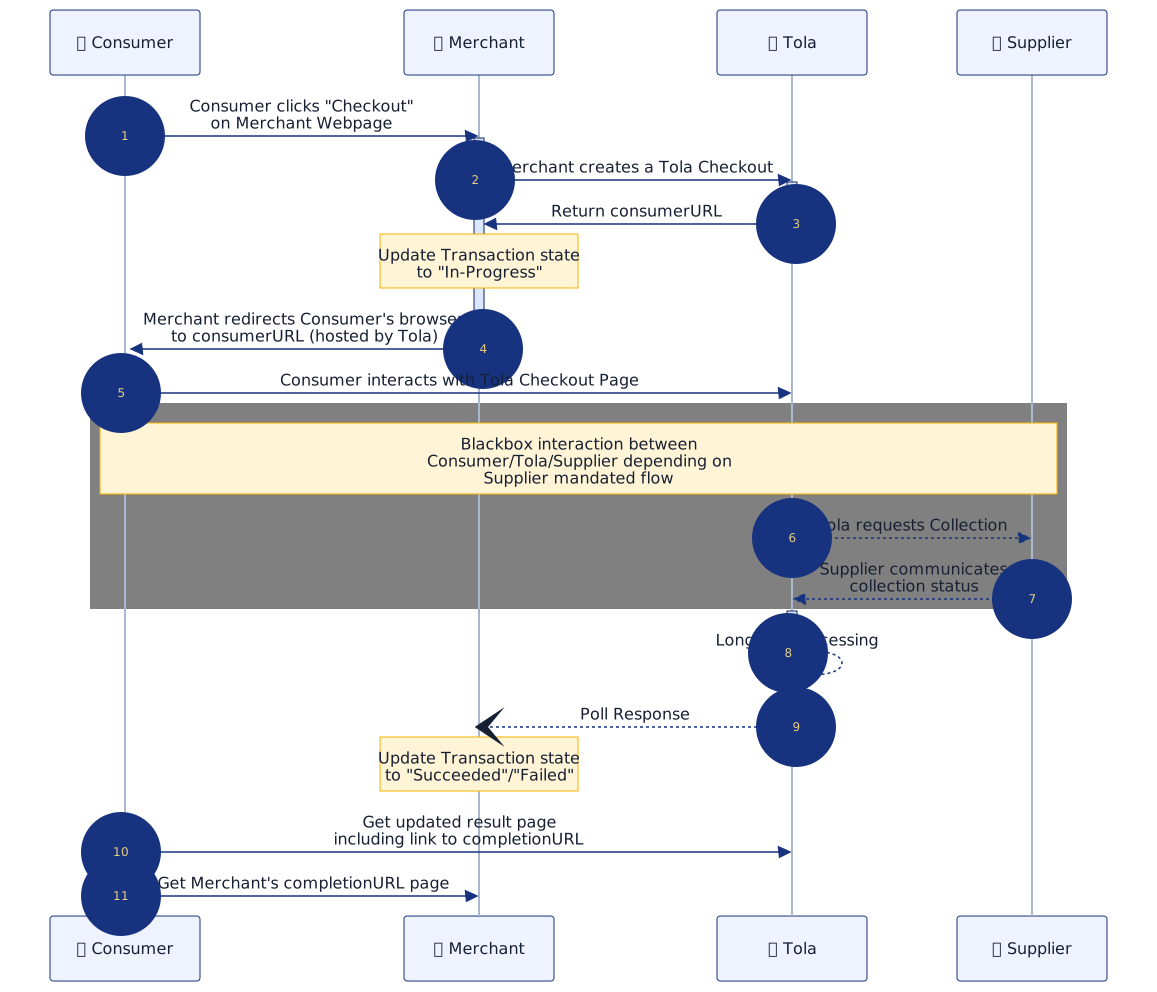
Detailed sequence description
(1) The Consumer wishes to purchase one or more items from a merchant's webpage and clicks a "Checkout" button.
(2) The Merchant calls the Tola Checkout API to create a Checkout Session.
curl -X POST \
  --user username:password \
  --url https://apidocs.tolamobile.com/walletapi/testrelay/checkout \
  --header 'Content-Type: application/json' \
  --data '{
    "currency": "KES",
    "merchantConsumerID": "customer-12345",
    "initiatorReference": "merchant-unique-ref-123XYZ",
    "completionURL": "https://merchant.com/tolaCompleted",
    "metadata": {
      "trackingRegion": "Kenya",
      "trackingId": "5"
    },
    "items": [
      {
        "description": "Test Product",
        "amountCentile": 100,
        "quantity": 1,
        "productCode": "SKU-001"
      }
    ]
  }'
curl -X POST \
  --user username:password \
  --url https://apidocs.tolamobile.com/walletapi/testrelay/checkout \
  --header 'Content-Type: application/json' \
  --data '{
    "currency": "USD",
    "initiatorReference": "18d0eb2c-6ee7-bf71-796f-7275ad963053",
    "completionURL": "https://merchant.example.com/tola/callback?trueReturn=https%3A%2F%2Fmerchant.example.com%2Fmy-account%2Ftx-history%2Ftola",
    "items": [
      {
        "description": "Deposit",
        "amountCentile": 500
      }
    ],
    "supplierTags": ["innbucks"],
    "metadata": {
      "restrict_msisdn": "263780000001"
    }
  }'
Idempotency
initiatorReference is used to implement idempotency for Checkout creation.
- The supplied
initiatorReferencemust be unique within a recent time window of 24 hours by default. - If the same
initiatorReferenceis submitted again within that window, Tola returns the same Checkout response that was returned the first time. - In that case the response header
idempotent-previously-seenwill be set totrue.
Optional Request Fields
The Checkout request supports the following optional fields in addition to the required currency, initiatorReference, and items fields:
merchantConsumerID— A merchant-supplied consumer identifier that can help Tola provide a more personalised Checkout experience across devices.completionURL— A URL to which the consumer can be returned after the Checkout is finalised. Maximum length:256characters.supplierTags— An optional list of supplier tags that can constrain the hosted checkout to a specific supplier. Supplying a single tag allows Tola to skip supplier selection in the hosted flow.metadata— A string key/value object that can be attached to the Checkout and later accessed via the Events API.items[].quantity— The quantity for an item. If omitted, the default is1.items[].productCode— A merchant-defined product code for the item, useful for downstream reconciliation and fulfilment.
(3) A Successful Checkout API response to the merchant will contain a consumer URL.
When the merchant receives this they must update the transaction on their system to be in an in-progress state.
{
  "response": {
    "checkoutReference": "00FF859C5TX",
    "consumerURL": "https://tolapayments.com/0/123/456789AB"
  },
  "success": true
}
(4) At this point the merchant should redirect the consumer to the provided consumer URL which is hosted on Tola's server.
Steps 5-7 below involve interactions between the Consumer, Tola and the Supplier and will vary depending on the Supplier mandated flow.
If multiple suppliers are available for the checkout, the Tola-hosted user flow will ask the consumer to choose one. To skip that supplier-selection step, the merchant can optionally provide a single value in
supplierTags to constrain the checkout to that supplier.
(5) The consumer interacts with the Tola hosted Checkout page, this will contain the payment options configured for the merchant depending on their requirements.
(6) Once the consumer selects their chosen payment method to complete the payment, Tola will request a payment collection from the chosen Supplier.
(7) The supplier will notify Tola of the final status of the payment collection.
(8) The merchant must call the Events API using long polling in the background to determine the final status of the Checkout.
(9) When the merchant receives the associated checkout event from the Events API response, they must update the transaction status in their system to Succeeded or Failed based on the checkout event's outcome.
(10) Since at this point Tola will know the final status of the Checkout, a checkout result page hosted by Tola will be shown to the consumer indicating the result of the transaction.
(11) Depending on the merchant's preferred configuration the consumer can be re-directed to the merchant's completion URL in one of 2 ways:
- Automatic re-direction after displaying of the Tola Checkout Result Page.
- The Consumer must click on a "Return To Merchant" button on the Tola Checkout Result Page.
It is also possible to omit a completion URL in a checkout API request; however, doing so means the consumer will not be able to navigate back to the merchant's site after completing the checkout.